You will build
A JSON API for ACME's Tool catalogue: anyone can read it, only ACME's stock system can add to it, and resellers get a tidy /tools/chisels style address.
You need
- A collection with entries (make one)
curlor any HTTP client to test with
Three layers
The collection's own API switches, project API tokens for machines, and the API Builder for custom endpoints - no code in any of them.
Step 1: Open the collection for reading
Open the collection in Data > Collections and go to its API & Export tab. Each verb - read, create, update, delete - has its own switch and its own access:
- Public - anyone
- a role, meaning signed-in users at that level or above
- API token, meaning a machine with a token for this project
Switch on read with Public - anyone, and leave create, update and delete off for now. Fill in Read fields to limit what a read returns, so internal notes never leave the site. Save.
Try it:
curl 'https://acme.example/api/v1/tool-catalogue?limit=10'
/api/v1 is the stable, versioned address for every collection. The usual list options work: page, limit, sort, order, search and filters such as filter[category]=chisels or filter[price_lte]=50. Add resolveRefs=true to have reference fields come back as readable labels, and number fields always come back as numbers.
Step 2: Let a machine write, with a token
ACME's stock system should be able to add products, and nothing else should.
- On the collection's API & Export tab, switch on create with API token. Save.
- Go to System > API Tokens and click the + (New token) button.
- Name it
Stock feed, choose the Project (tokens belong to one project and only work on its collections), add Scopes to limit it to this collection and verb if you like, and set when it Expires. - Create it. The token -
dcms_followed by 64 characters - is shown once. Copy it into the other system now; Domma CMS keeps only a fingerprint of it.
Now the stock system can post:
curl -X POST 'https://acme.example/api/v1/tool-catalogue' \
  -H 'Authorization: Bearer dcms_...' \
  -H 'Content-Type: application/json' \
  -d '{"data": {"name": "Mortise chisel 8mm", "category": "chisels", "price": 41}}'
New entries are stamped with the token that made them. The API Tokens screen shows when each token was last used; switch one off, edit it or revoke it at any time, and you are warned before one expires.
Step 3: Add a friendly endpoint with the API Builder
Resellers want GET /tools/chisels, not query strings. Go to Data > API Builder and create an endpoint:
- Name:
Tools by category - Project:
core - Path:
/tools/:category-:categoryis a parameter taken from the address - Collection:
tool-catalogue - Mode: List - array of entries (or Single - first match or 404 for one entry)
- Access: Public - no credentials (or Token - project API token)
- A filter:
categoryequals{{params.category}} - Sort field
price, Ascending, a Limit of 50 - Response fields:
name,price,category- only these are ever returned
Click Save and send to try it in the built-in console, which makes a real request without your admin sign-in - exactly what a stranger would get.
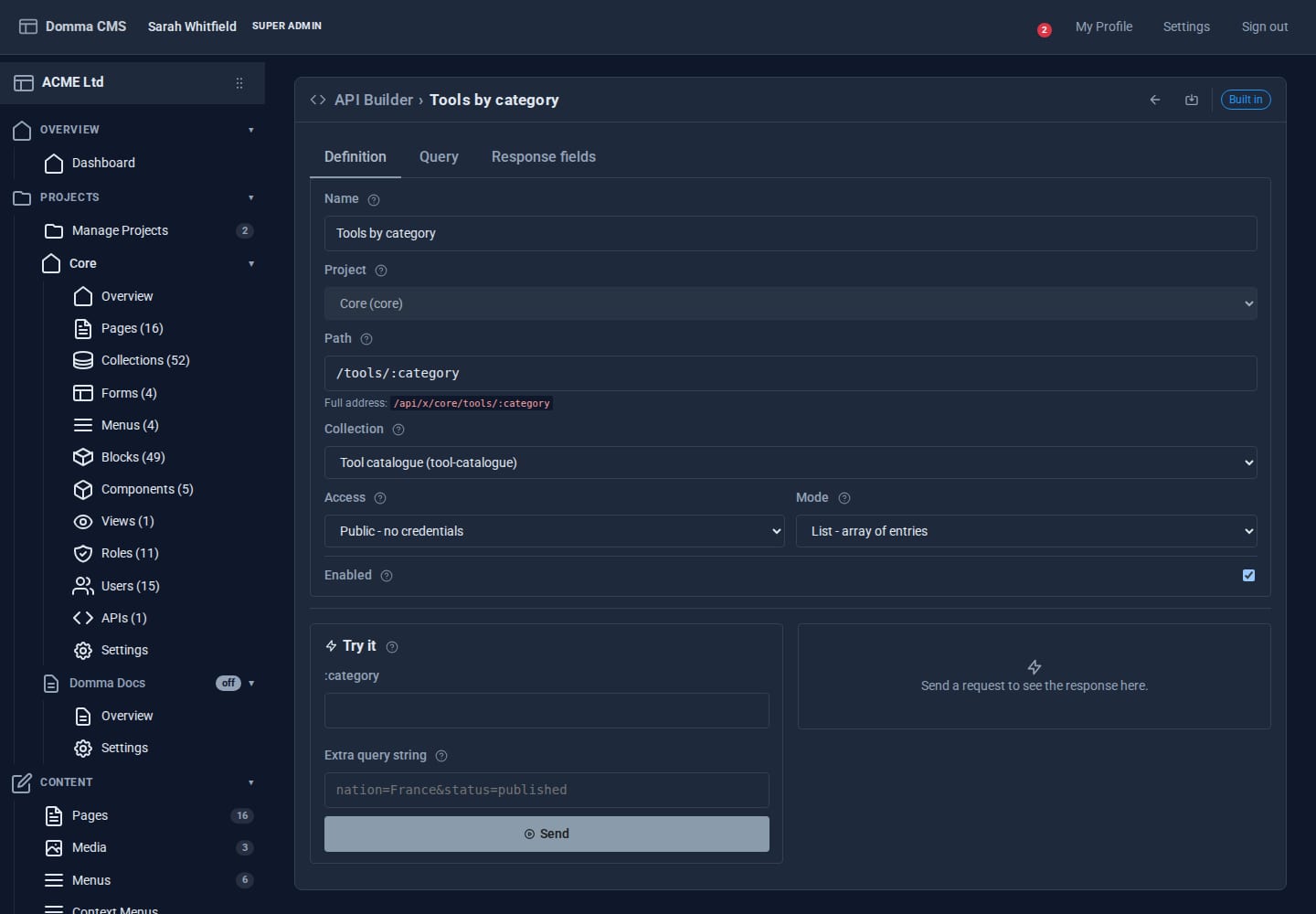
The endpoint lives at /api/x/<project>/tools/chisels, and the editor shows the Full address. Public responses are cached and refreshed automatically whenever the data changes.
A filter value can also come from the query string with {{query.x}}; when the caller leaves it out, that filter is simply dropped - handy for optional filters.
Step 4: Keep it safe
- A disabled project switches off its whole external API at once.
- Endpoints can only reach their own project's collections (or core ones), never system data like users.
- A token only works where the access is set to API token, and a sign-in token never works there - the two cannot be mixed up.
What you built
A read-only public API, a write channel locked to one machine with a revocable token, and a clean custom endpoint for partners - all switched on from screens, with nothing to deploy.
Keep going
- Reporting with Saved Views
- Build your first Tool - when you need real code
- The full reference is in the admin under Documentation > API Reference > External API & Tokens and API Builder.
Try it on your own site
Everything in this tutorial is free. One command gets you a site to follow along on.