You will do
Find every broken link on ACME's site, catch visitors who hit a missing page, and send them where they meant to go - in a few clicks.
You need
- SEO Pro on your site
- The built-in SEO Tool switched on (it is by default)
Why
Broken links cost you visitors and search ranking, and they creep in every time a page moves or another site changes.
Step 1: Run the first check
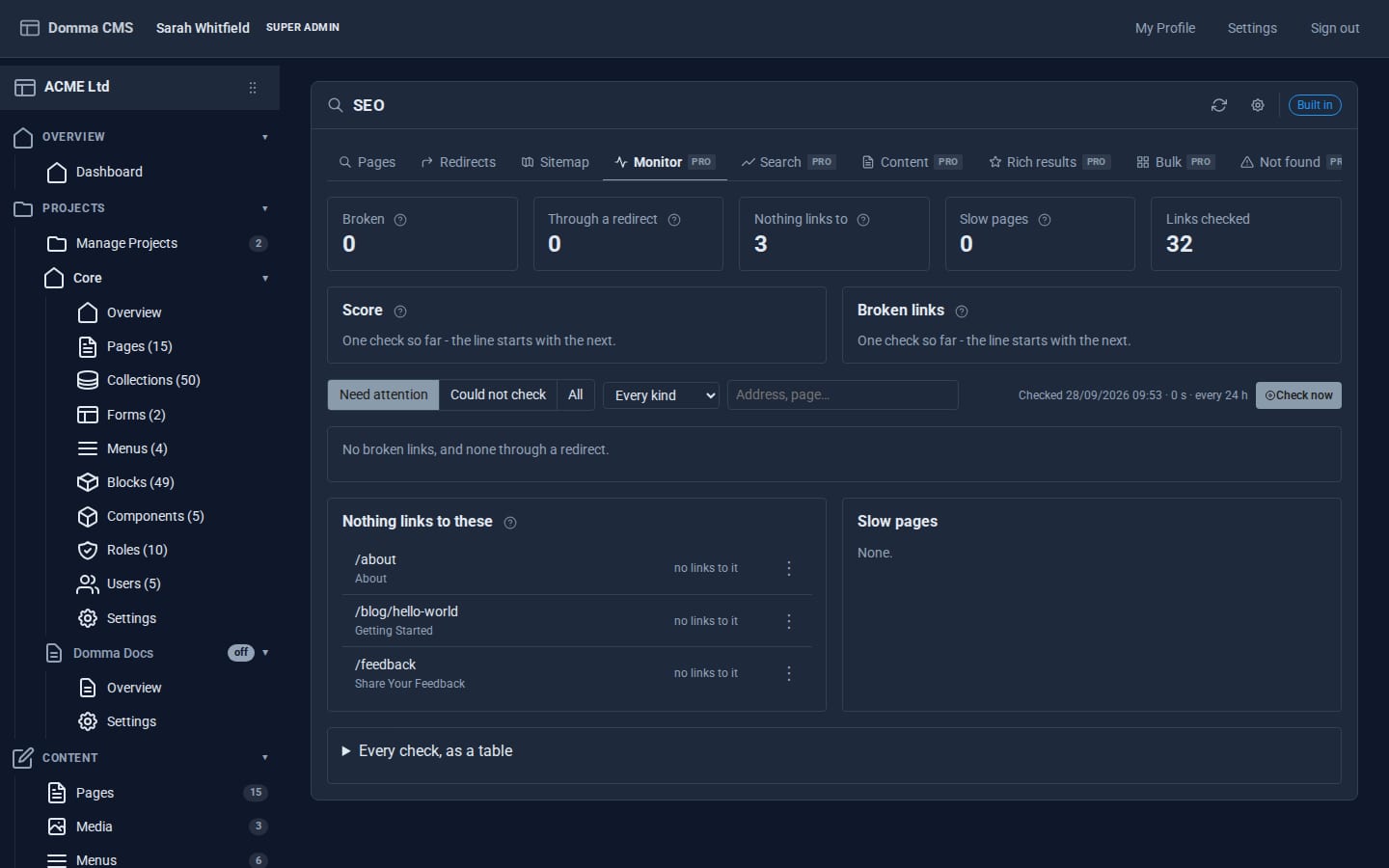
SEO Pro adds its tabs to Tools > SEO. Open Monitor and click Check now. It runs the SEO audit, then checks every link and image on every page - your own and other sites' - following redirects to see where they end up.
The tiles show what it found: Broken, Through a redirect, Nothing links to, Slow pages and Links checked. The Score and Broken links charts track each check over time, so you can see things improve.
Step 2: Fix broken links
Right-click a broken link (or use the ⋮ button) to open the page it is on, open the link itself, redirect it, or copy it. Links to other sites that answer "not allowed", "too many requests" or time out are shown as could not be checked - not as broken - so you are never sent chasing a site that just dislikes robots.
Nothing links to these lists pages in your sitemap that no other page links to. Link to them from a related page or a menu, or search engines and visitors may never find them. Slow pages lists pages that took the server more than 1.5 seconds to build.
From now on the check runs by itself every 24 hours, and you are notified when new links break or the score drops by 10 or more.
Step 3: Catch visitors who hit a missing page
Open Not found. SEO Pro logs every missing address people asked for, with visits in the last 7 days and where they came from. Scanner noise - WordPress probes and the like - is left out.
- A red entry means a link on your own site leads there. Fix that link.
- Click the fix button to redirect to the page SEO Pro suggests, or right-click for Redirect somewhere else..., Ignore this address or Forget it.
Filter by Not redirected, From your own links or All. If a missing page is visited 20 or more times in a day, you are told.
Step 4: Moving from an old site
In Bulk, give SEO Pro your old site's sitemap address (or paste a list of old addresses). It plans each one - still live, already redirected, same page, a likely match, or nothing - and applies the plan as redirects in one go, with 410 gone where there is no new home. Copy the plan as CSV to check it with your team first.
What you built
A site that checks its own links every day, tells you when something breaks, shows where visitors fall into dead ends and fixes them with one click - and a safe way to bring an old site's addresses across.
Keep going
- Getting found on search engines - the free SEO Tool SEO Pro builds on
- SEO Pro - also rich results, content checks, bulk titles and Google Search Console
Want SEO Pro on your site?
SEO Pro is a Pro Tool. Tell us about your site and we will set it up with you.