You will do
Take ACME's site from "published" to "findable": good titles and descriptions, a clean audit, working redirects and a sitemap Google can read.
You need
- A site with a few published pages
- Its public address (the Site URL)
Included free
SEO is built into Domma CMS - there is nothing to install. SEO Pro adds Search Console, rich results and more.
Step 1: Set the site's own address
Search engines need one address for each page. Go to System > Site Settings > General and set Site URL, for example https://acme.example. Canonical links, share links and the sitemap are all built from it; until it is set, the SEO screen warns you that they use whatever address a visitor came in on.
While you are in Site Settings, open the SEO tab and set a default title, separator and description. These are used for any page that has none of its own.
Step 2: Open the SEO screen
Go to Tools > SEO. The CMS fetches every page in your sitemap and scores it: title and description length, a single main heading, heading order, word count, image alt text, internal links, focus keyphrase, canonical, share image and structured data.
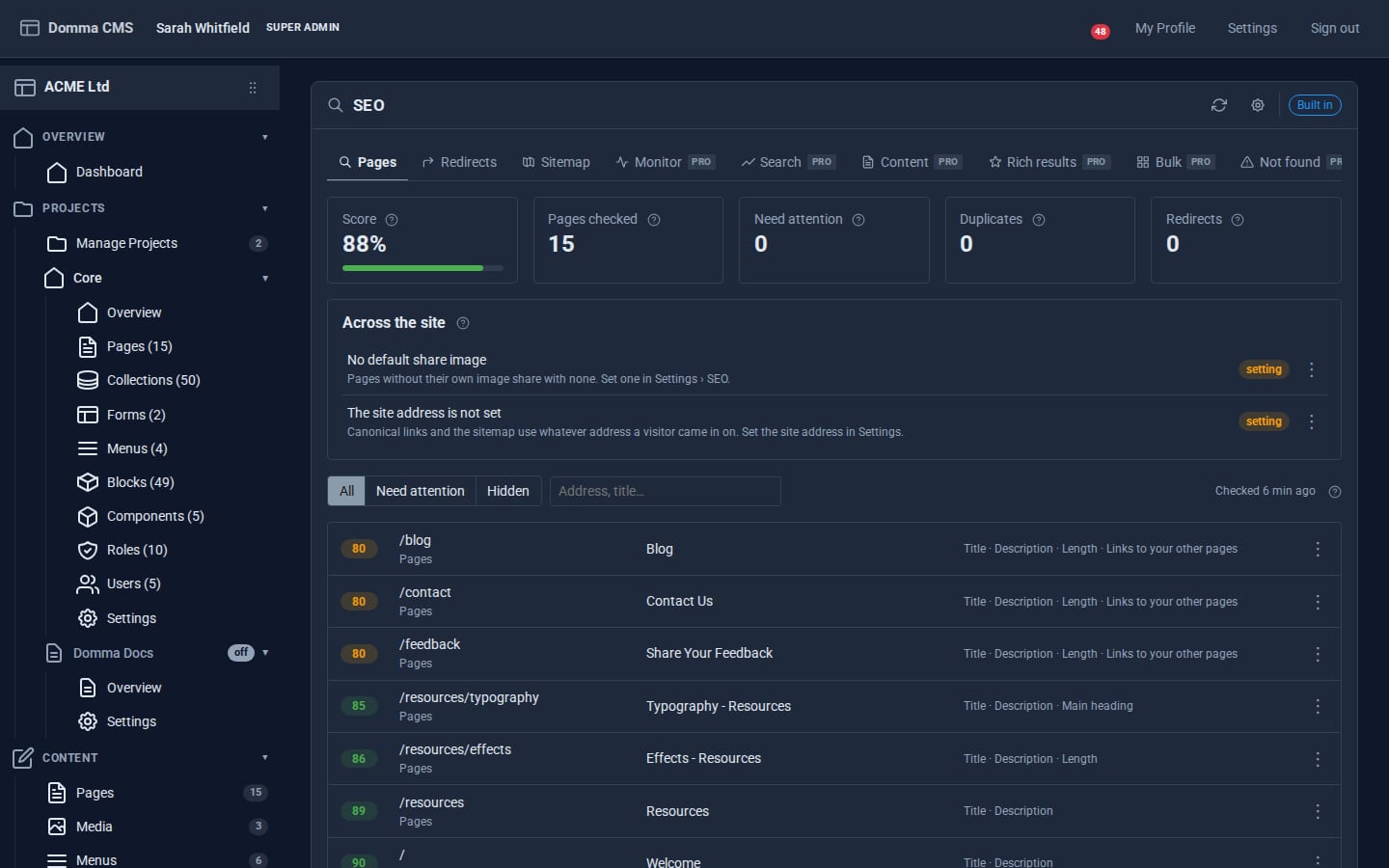
At the top: the overall Score, Pages checked, Need attention, Duplicates (pages sharing a title or description) and Redirects. Across the site lists problems that are not about one page, such as a missing default share image. Click the refresh button in the banner to check every page again at any time; a scheduled re-check runs by itself too.
The tabs marked Pro are added by SEO Pro. Without it you have Pages, Redirects and Sitemap.
Step 3: Fix a page
Filter to Need attention and click a page. A panel opens showing As it will look: the page as a Google result and as a share card.
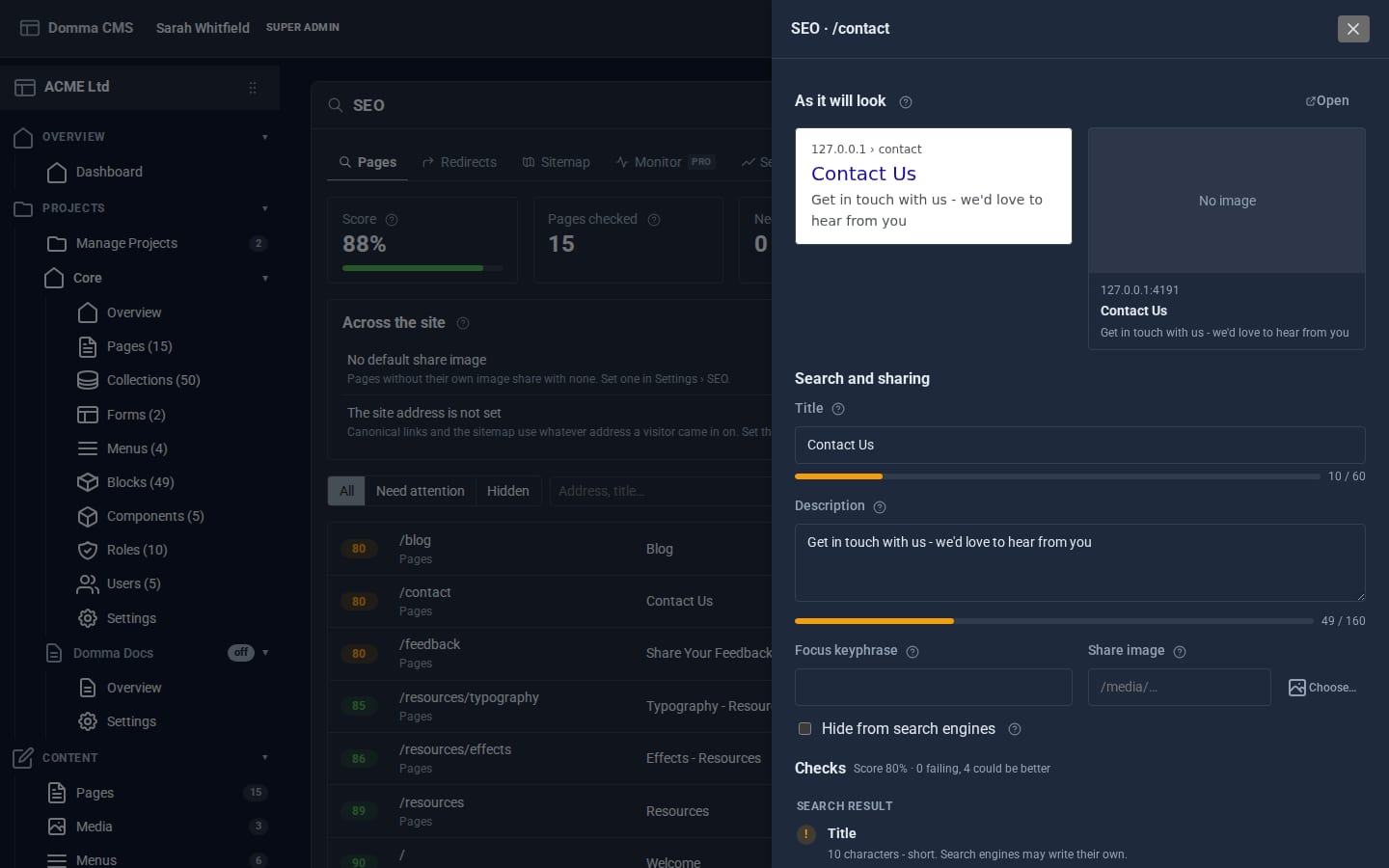
Under Search and sharing:
- Title - aim for the green part of the bar (up to about 60 characters). Lead with what the page is about:
Hand chisels made in Sheffield | ACME Ltd. - Description - one or two sentences, up to about 160 characters, that make someone want to click.
- Focus keyphrase - the search you want this page to win, such as
sheffield chisels. The checks then look for it in the title, heading and first paragraph. - Share image - the picture shown when the page is shared on social media.
- Hide from search engines - for pages that should never appear in results.
The Checks list below says what passes, what could be better and why. Save, and the page's score updates.
You can also fill in the SEO title and description on the page editor's SEO tab while you write.
Step 4: Keep old links working
Renaming a page in Domma CMS adds a redirect from its old address automatically. For everything else - an old site's addresses, a product you have retired - use the Redirects tab:
- Under Add a redirect, put the old path in From (
/products/chisels.html) and the new one in To (/shop/chisels). - Choose the Kind: 301 moved for a permanent move (the usual choice), 302 for a temporary one, or 410 gone for a page that is not coming back.
- Add a Note so you remember why, and save.
Each redirect counts its hits, and you can import a list from CSV when moving a whole site across. Right-click a redirect to test it.
Step 5: Check the sitemap
The Sitemap tab shows every address in /sitemap.xml and the pages left out of it - drafts, private pages, pages hidden from search engines and the 404 page. It also shows your robots.txt, which points search engines at the sitemap and keeps them out of /admin and /api.
Submit https://your-site/sitemap.xml once in Google Search Console and Bing Webmaster Tools. After that it stays up to date on its own whenever a page changes.
Step 6: Say who is behind the site
Open SEO settings (the cog in the banner) and fill in Who is behind the site - an organisation, local business or person, with a logo, address and your profiles elsewhere. Domma CMS adds this as structured data to your home page, which helps search engines show your business details correctly.
What you built
A site search engines can read and trust: one address per page, titles and descriptions written for people, a green audit, redirects for every old link and a sitemap that looks after itself.
Keep going
- Fixing broken links with SEO Pro
- Draft, review and publish
- SEO - everything the built-in SEO Tool does
Try it on your own site
Everything in this tutorial is free. One command gets you a site to follow along on.