Somewhere to write it down, right where you work.
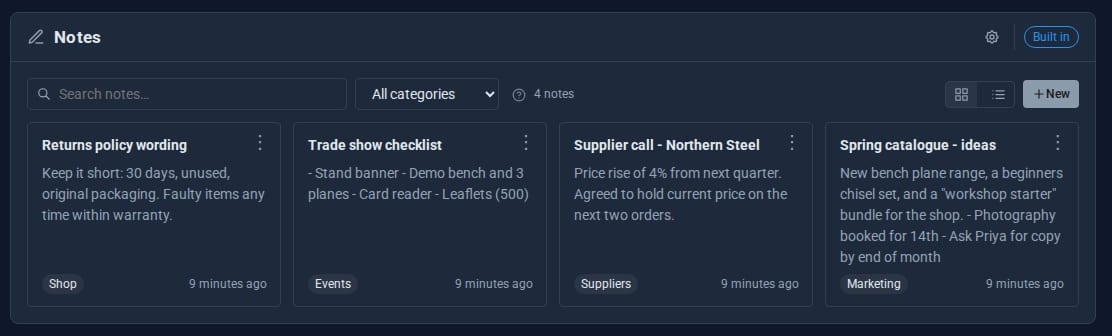
Notes gives everyone who signs in their own private notebook inside the admin. Supplier prices, returns wording, meeting points: jot them down, file them by category and find them again in seconds.

What Notes does for you
Private to you
Each person's notes are their own. Nobody else on the site can read them.
Categories
File notes under categories and filter by one with a click, straight from a note's menu.
Find it again
Search matches titles, text and categories. Press / to jump to the search box.
Cards or a list
A card layout to browse, or a dense list when you have hundreds.
Quick to write
Press N for a new note and Ctrl+Enter to save. Notes open in a panel with a word count.
Duplicate and copy
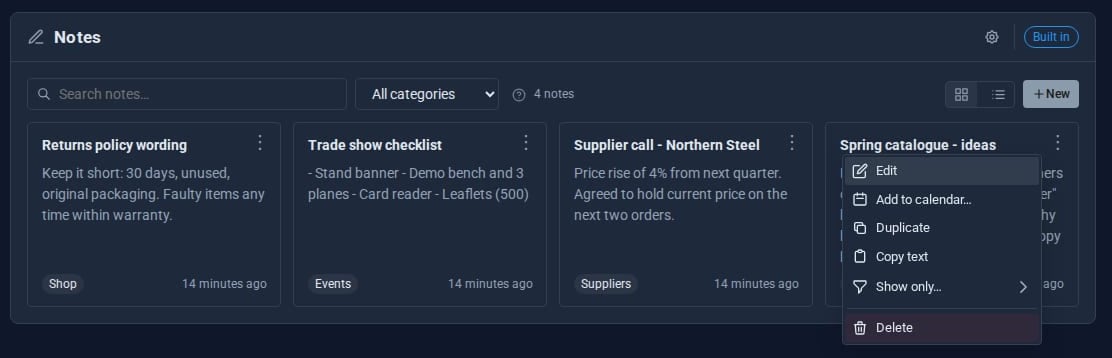
Every note's menu duplicates it, copies its text or deletes it.
See it
Try it in 5 minutes
- Open Tools > Notes in the admin.
- Press
N, give the note a title and a category such as Suppliers, and write. - Press Ctrl+Enter to save.
- Press
/and type a word from the note. Search finds text and categories alike. - Use the cog to choose cards or list, the sort order and the categories offered for new notes.
Works with the rest of your site
Calendar
With the Calendar Tool, a note shows its related events and can be added to the calendar.
MongoDB
On a site with a MongoDB connection, notes are stored there automatically.
Good to know
Notes belong to the person who wrote them. Settings such as layout and sort are remembered per browser.
What it needs
Nothing. Notes is built in and on by default, and can be switched off if you have no use for it.
Questions
Notes are private by design. To share writing with colleagues, the Docs Tool has sharing, public links and version history.
They are kept. Switch Notes back on and everything is where you left it.
Learn it step by step
Goes well with
Notes comes with every site
A private notebook for every member of your team, built into Domma CMS.