What needs doing, and what is due today.
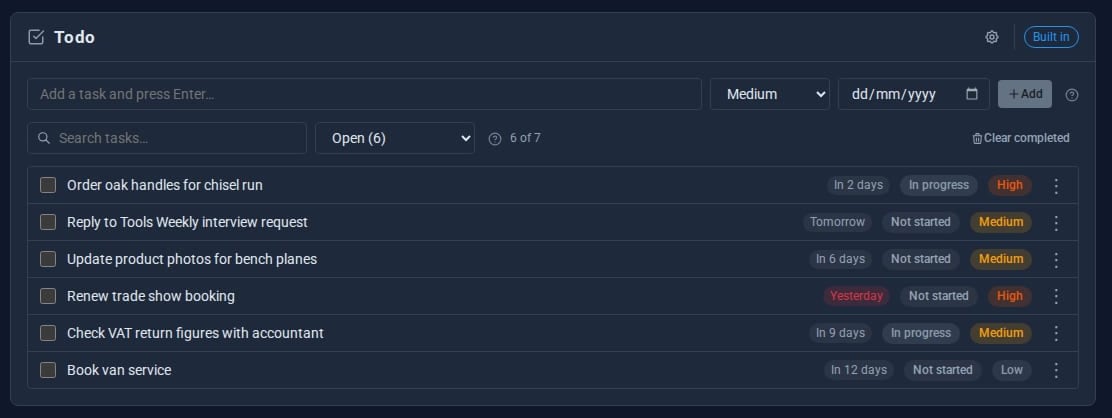
Todo is a to-do list for everyone who signs in. Type a task, press Enter, give it a priority and a date, and Domma reminds you each day of what is due and what has slipped.

What Todo does for you
Type and press Enter
Add a task in one line, with an optional priority from highest to lowest and a due date.
Three statuses
Not started, in progress and completed. Completed tasks sink to the bottom.
Dates in plain words
Due dates read Today, Tomorrow or 3 days ago, so the overdue ones stand out.
Filters
Open, All, each status and Overdue, plus search across your tasks.
A daily reminder
A notice each day lists what is overdue and what is due today.
On the calendar
With the Calendar Tool, your open to-dos appear on their due days.
See it
Try it in 5 minutes
- Open Tools > Todo in the admin.
- Type Order oak handles, choose High and a date, and press Enter.
- Right-click the task and mark it In progress.
- Switch the filter to Overdue to see what has slipped.
- Tick a task to complete it. Clear completed tidies the list when you are ready.
Works with the rest of your site
Notifications
A daily notice lists your overdue and due-today to-dos.
Calendar
A To-dos layer shows open tasks on their due days.
Good to know
Each person's list is their own. The cog sets the opening filter, sort, default priority and whether dates read as words.
What it needs
Nothing. Todo is built in and on by default. On a site with MongoDB it is stored there automatically.
Questions
Todo is a personal list. For shared work - projects, issues on a board, sprints and watchers - see Waypoint Pro.
Learn it step by step
Goes well with
Todo comes with every site
A to-do list for every member of your team, with a daily reminder, built into Domma CMS.