Let your visitors pick the look.
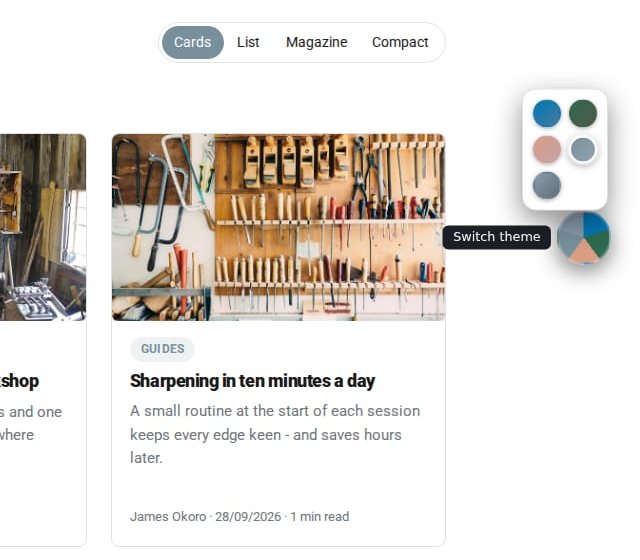
The Theme Switcher puts a small floating disc on your site so visitors can choose the colours they prefer, light or dark. You decide where the disc sits.
What Theme Switcher does for you
Plenty to choose from
Visitors pick from Domma's public themes: fourteen palettes, each in light and dark.
Easy on the eyes
Someone reading late can switch to a dark theme; someone in bright sun to a light one.
Placed where you like
Six anchor positions with offsets, so it never covers your content.
Or switch automatically
Prefer to choose for them? Automatic day and night switches theme at set times in the visitor's own clock.
Regions too
Element overrides give one region of a page its own theme, such as a light navbar on a dark site.
One page, its own look
Give a single page a different theme from the rest of the site, from its Page Details.
See it
Try it in 5 minutes
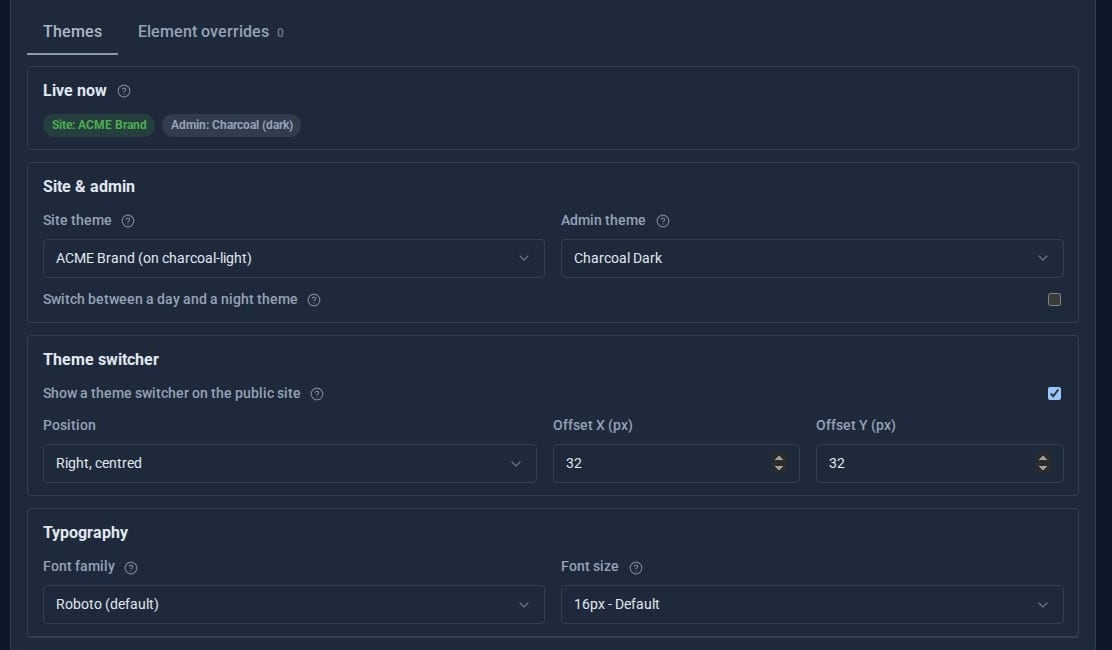
- Open Content > Theme in the admin.
- Under Theme switcher, tick Show a theme switcher on the public site.
- Pick a position, such as right, centred, and nudge it with the offsets if it sits over something.
- Save (Ctrl+S) and visit your site: the disc is there for every visitor.
- Prefer to choose for them? Tick Switch between a day and a night theme instead, with your two themes and times.
Good to know
Domma CMS has 37 built-in themes: 28 for your site (14 palettes, light and dark) and 9 for the admin, chosen separately.
What it needs
Nothing. The switcher has been part of Domma CMS's theming since 0.67.
Learn it step by step
Goes well with
Theming comes with every site
37 themes, day and night switching and a visitor theme switcher, all in Domma CMS.